im placing my stuff in the editor and i have to move my mouse all the time to grab ablock. MAYBE a copy and paste thing with ctrl c + ctrl v or a special tool you can select to place blocks of that type.
thanks for whoever answers!
im placing my stuff in the editor and i have to move my mouse all the time to grab ablock. MAYBE a copy and paste thing with ctrl c + ctrl v or a special tool you can select to place blocks of that type.
thanks for whoever answers!
Do you know that you can use Ctrl + click on a block to duplicate it? If so, can you describe in more details the use case that you’ll like a tool for? Thank you!
P.S.: In the level editor, you can use Shift + click to select more than one object, and then if you use Ctrl + click you can duplicate all the selection. You can also Shift + click/drag in an empty space to start a selection rectangle.
well i meant like… a toolbar with (for example) the block placer, the copy + paste thing etc. for mobile and PC. but thanks for that!
I am not sure what you mean by block placer. Can you describe more in detail what is a “block placer”?
Copy/paste we would need an explicit notion of block selection, which we do not have at the moment. But in theory it is doable.
Btw, do you know you can also duplicate a row using ctrl + click/drag?
i already know but i meant:
you click the button and select a block you want to constantly place.
then place it like that. maybe it could be a mobile feature since most tablets dont have keyboards.
Oh I see! You want a mode where a block can be placed in a single click, right?
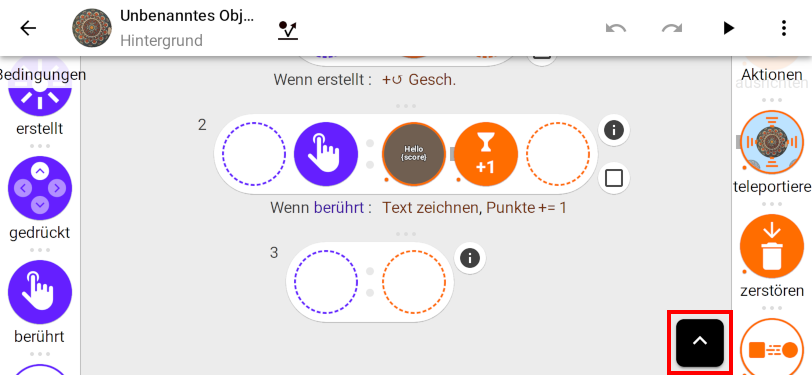
Note that currently, on mobile, Candli shows a virtual command/control key (depending on whether you are on iOS or something else), that you can press using multi touch, allowing you to quickly duplicate a block. Hold that virtual key while dragging a block will duplicate it:
So you can place a block once, and then duplicate it without having to bring it back from the side palette each time. Is that useful to you?